I run WebEquipe, a small product studio, and one of our plugins has a real but narrow audience: WordPress sites with PDFs nobody can search. Finding those sites one by one isn't a job for a team of one — so I built an n8n AI lead generation agent system: five workflows, chained together, that discover targets, verify them, find a human to email, and send that email, automatically, every day.
This post is both things at once: a real case study — it's been running against a database that now tracks over 4,000 leads — and a working tutorial. Every code snippet below is the actual logic, cleaned into a template you can drop into your own n8n instance today. By the end you'll have a working pipeline and understand exactly why it's built the way it is.
What you'll need
An n8n instance — cloud or self-hosted, either works
A Notion account for the shared lead database
API access to: Google Gemini (or any n8n-supported chat model), Perplexity, SerpApi (Google Search), Snov.io (email finding + verification), Gmail, and optionally Slack for run summaries
About 30–45 minutes for initial setup, most of it spent creating API keys
None of these need a paid tier to start — every one of these tools has a free tier enough to test the full pipeline before you commit to volume.
The architecture, at a glance
Agent 1   → discovers candidate websites          (the only step with AI)
Agent 1.5 → verifies each one is real              (zero AI, real HTTP checks)
Agent 2   → finds a human's email address
Agent 2.5 → emails the generic address directly
Agent 3   → adds verified contacts to a drip campaign
The one design decision that matters most, before you build anything: the AI only proposes leads. Every fact after that is checked with real code, not model confidence. Keep that separation as you build, and the whole system stays trustworthy.
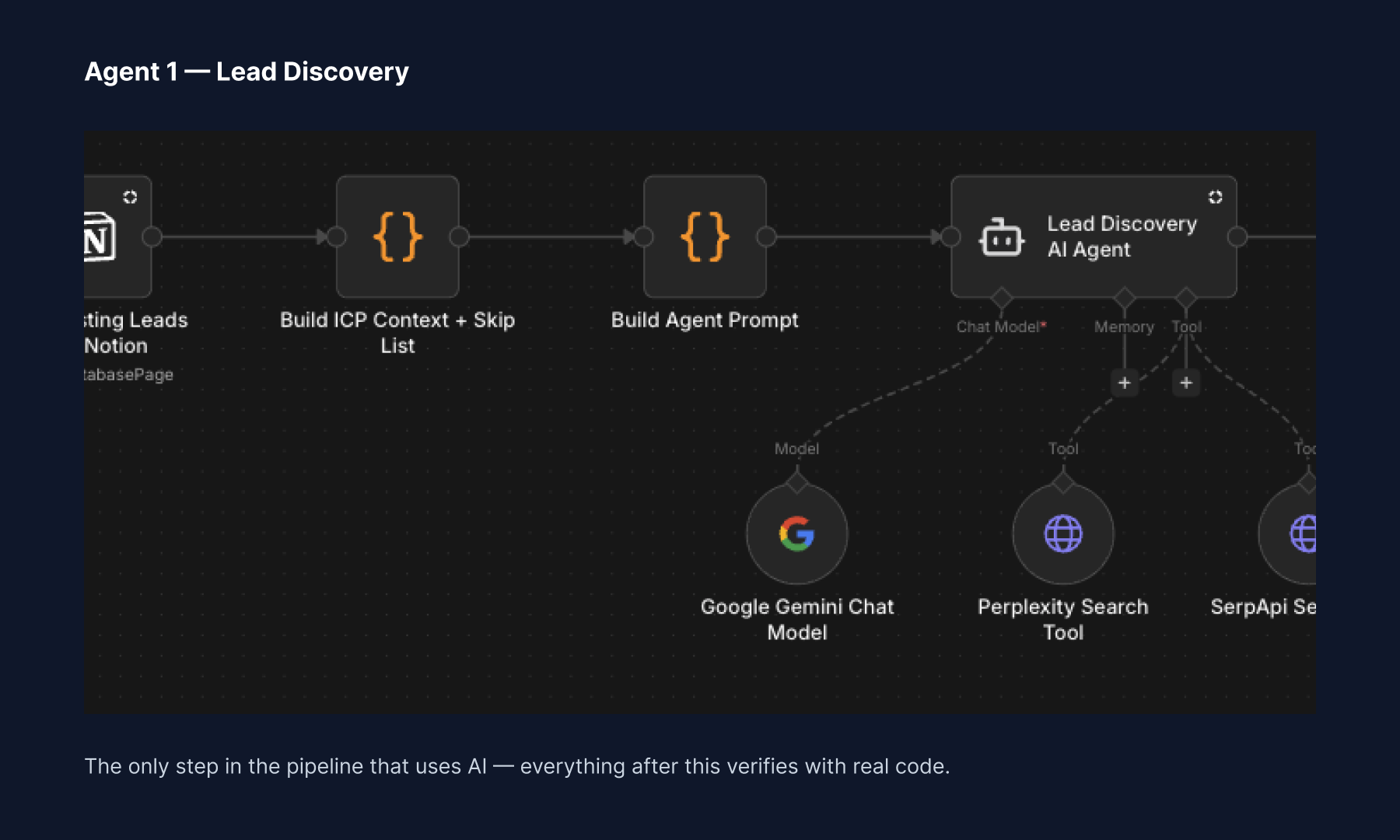
Agent 1 in n8n — the only step in the pipeline that uses AI. Everything after this verifies with real code.
Step 1: Build the discovery agent
This is your only AI-reasoning step. It needs a system prompt (what to look for), a data-gathering step before it (what to search for today), and two tools: Perplexity and Google Search via SerpApi.
Start with the data-gathering code node — this is what decides today's target audience and builds the search queries, so the agent isn't hardcoded to one static query forever:
// Rotates through your target-audience list day by day
const icps = [
  {
    name: 'Example ICP 1',
    who: 'Describe the type of organization or business you\'re targeting',
    pain: 'The specific problem your product solves for them',
    qualifying_signals: [
      'A fact you can verify with a real HTTP request',
      'A size/scale signal, e.g. "small, single-location"',
    ],
    perplexity_prompt: `List 15 [target org type] in ${region} that [signal]. Include website URLs.`,
    google_operator: `"target keyword" site:type -inurl:blog`,
  },
  // add more ICPs here — the pipeline rotates through however many you define
];

const icpIndex = dayNumber % icps.length;
const todayIcp = icps[icpIndex];
Then the system prompt itself. The one rule that matters more than any other:
URL RULE (strict — do not weaken this):
Only use a website_url that appeared literally in a Perplexity result
or a SerpApi search result — copy it exactly as returned. Never
construct or guess a domain from an organization's name.
I can't overstate this line. Early on, without it, the agent would occasionally invent a plausible-sounding site that didn't exist. Adding this one rule eliminated most hallucinated leads — more on that below.
Wire the agent up with strict output rules too — force it to return only a JSON array, nothing else, or your next node's parser breaks:
OUTPUT RULES:
- Your entire response must be a single JSON array and nothing else
- The first character must be [, the last must be ]
- No prose, no markdown fences, no apologies
Connect Perplexity and SerpApi as tools to this agent node, run it manually once, and confirm you get back a clean JSON array of candidate sites.
Step 2: Build the verification agent (no AI here)
This is the step most AI-agent tutorials skip, and it's the one that actually makes the system usable. Agent 1's output is a hypothesis. This step turns it into a fact — using zero AI, only real HTTP requests.
Three checks, in order:
// 1. Confirm the platform (adapt this fingerprint to whatever your
//    product needs — WordPress, Shopify, a specific tech stack, etc.)
const isWordPress = html.includes('wp-content') || html.includes('wp-json');

// 2. Scrape any visible contact info
const emails = html.match(/[a-zA-Z0-9._-]+@[a-zA-Z0-9._-]+\.[a-z]{2,}/g);

// 3. Confirm the actual qualifying signal — run a real search against
//    the site itself rather than trusting the AI's claim
const hasQualifyingContent = searchResultsHtml.includes('your-signal-here');
Only leads that pass all three get marked Qualified. Everything else gets marked Rejected — and stays in your database so Agent 1 never rediscovers it.
Step 3: Build the email-finder agent
For every qualified lead, call an email-finding API (I use Snov.io) to pull known emails and people at that domain. The part worth stealing here isn't the API call — it's the scoring logic that picks the right contact:
// Score job titles for who actually manages a small org's website —
// not who's most senior
function scoreTitle(title) {
  const t = title.toLowerCase();
  if (t.includes('webmaster') || t.includes('web')) return 10;
  if (t.includes('office manager') || t.includes('admin')) return 8;
  if (t.includes('marketing')) return 6;
  if (t.includes('ceo') || t.includes('director')) return 3; // lower on purpose
  return 1;
}
For a small organization, a webmaster or office manager is far more likely to actually read and act on an email about your product than a CEO buried in higher-priority things. Tune this scoring to match who your buyer actually is.
Step 4: Build the outreach agent
Not every lead has a named contact — many only have info@ or contact@. Before sending anything, verify the mailbox is real:
// SMTP-verify before sending — never email an address that might bounce
const genericPrefixes = ['info', 'contact', 'hello', 'support', 'admin'];
const candidate = emails.find(e => genericPrefixes.includes(e.split('@')[0]));
// -> pass candidate through your email-verification API before sending
Then send with a short, specific message and a rotating subject line — and add a delay between sends:
subject: subjectOptions[Math.floor(Math.random() * subjectOptions.length)]
// wait 60 seconds between sends to stay clear of provider rate limits
Keep the copy short and specific to the exact problem you solve. Generic outreach copy is the single biggest reason reply rates stay low — mine included, which I'll get to in Results.
Step 5: Build the list-adder agent
Once a lead has a verified email, push it into a segment-specific list in your outreach tool so your slower nurture sequences take over:
const listIds = {
  'Example ICP 1': 0000000, // your list ID for this segment
  'Example ICP 2': 0000000,
};
const listId = listIds[lead.icp];
This is the handoff point — cold discovery ends here, structured campaign management begins.
Set up the Notion database
All five agents read from and write to one Notion database, which acts as the pipeline's shared memory. At minimum you need: Website URL (title), ICP (select), Status (select), Email (email), and a few qualifying-signal fields matching whatever Step 2 checks. The full schema — every property every agent touches — is in the GitHub repo's setup doc, linked below.
Test it end to end before scheduling
Run each agent manually, in order, on a small batch first:
Agent 1 → check Notion for new "Identified" leads
Agent 1.5 → confirm leads move to "Qualified" or "Rejected" correctly
Agent 2 → confirm at least some leads get a real email
Agent 2.5 → send to your own email first, not a real lead
Agent 3 → confirm it appears in your list tool
Only turn on the schedule triggers once all five have run clean manually.
What actually broke
The honest answer: the AI hallucinated URLs and leads. Early on, the discovery agent would occasionally invent a plausible-sounding site that didn't exist, or attach a real organization to a URL that wasn't theirs. The fix wasn't a smarter prompt — it was removing the AI's authority at the point of truth entirely, which is exactly the Step 1 → Step 2 split above. If you build only one thing from this post correctly, make it that split.
Results so far
Real numbers, pulled straight from the tracking database:
4,183 candidate leads discovered
1,196 confirmed matching the target platform
371 confirmed to have the actual qualifying signal
400 outreach emails sent so far
274 verified human email addresses found
I won't overstate this: conversions are still at zero, and reply rates are low enough that I'm actively rewriting the outreach copy before scaling sends further — proof that the "keep outreach copy specific" advice above is one I'm still learning myself.
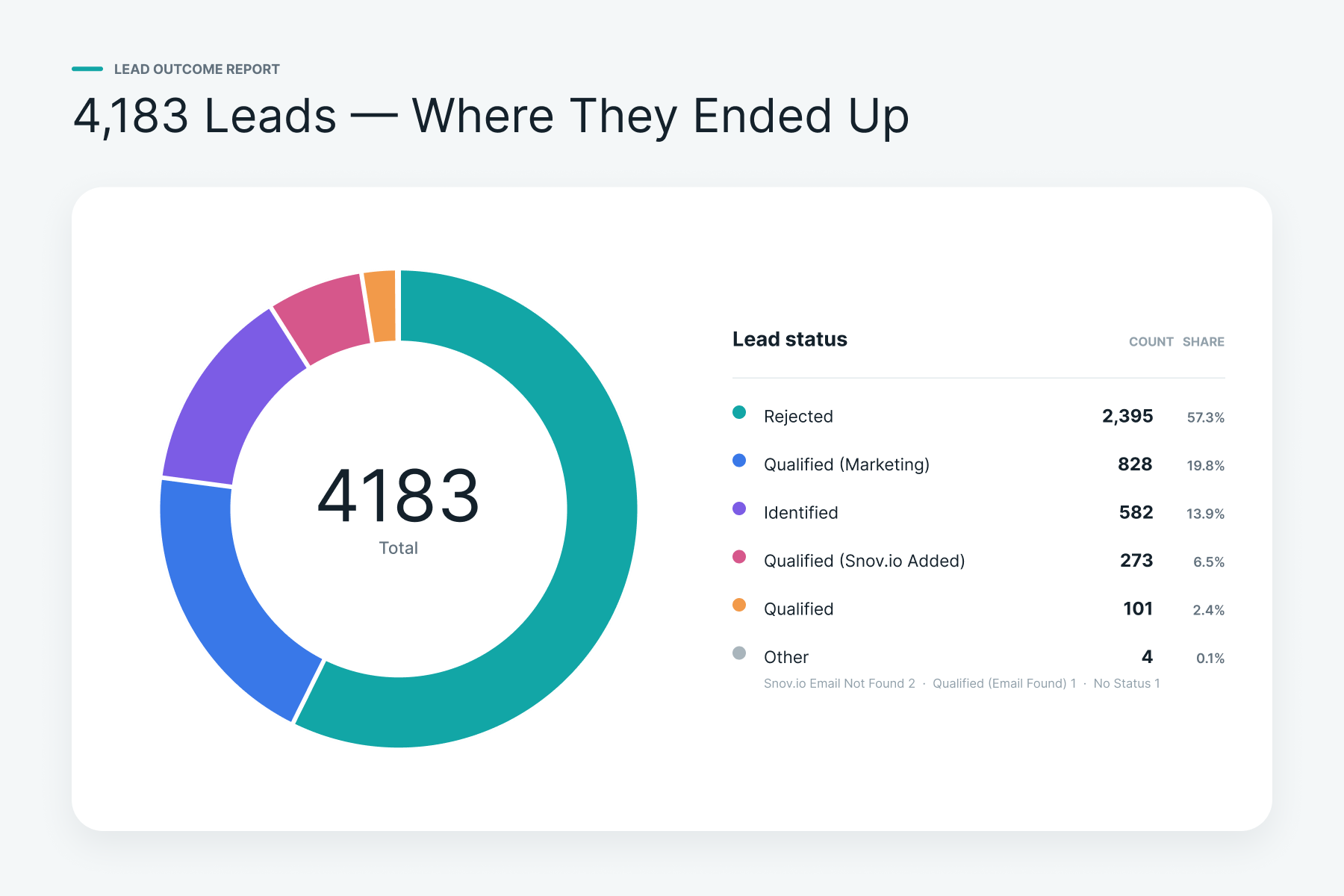
Where the 4,183 discovered leads ended up in the pipeline.
Get the template
Every workflow above is cleaned up and published as a template on GitHub, with the product-specific parts replaced by clearly marked placeholders — drop in your own product and target audience without touching the underlying logic. Get the template on GitHub